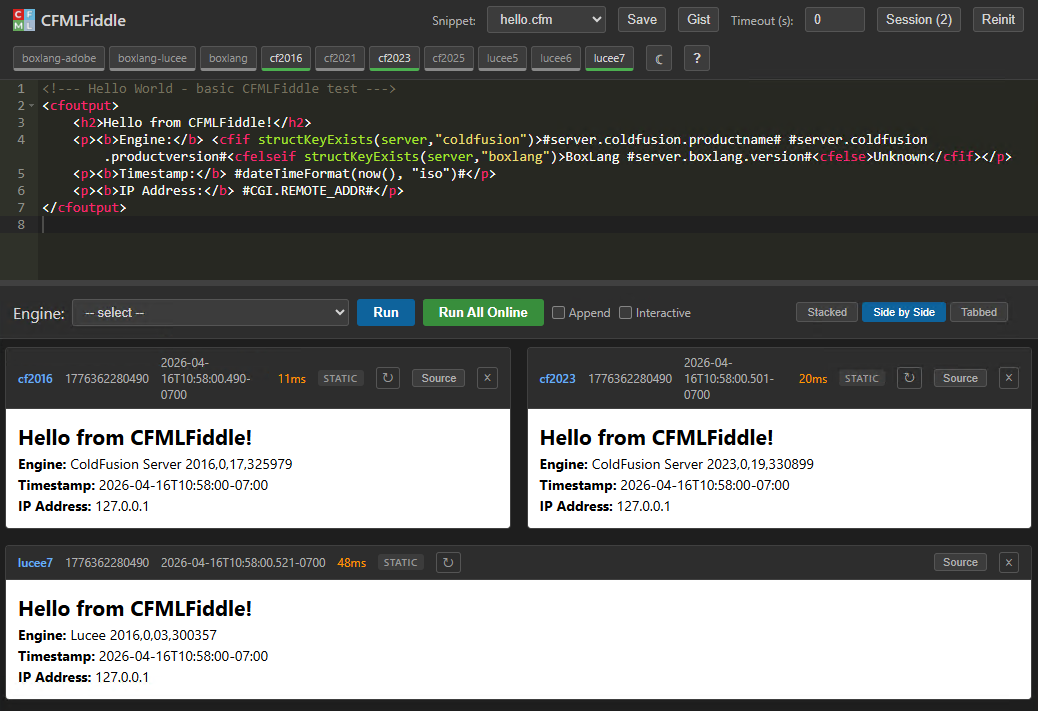
A self-hosted CFML playground. Run code against Adobe ColdFusion, Lucee, and BoxLang side by side.
Online CFML tools like CFFiddle.org, TryCF.com, and Try.BoxLang.io are handy for quick tests. cfmlFiddle is for when you need to control the exact engine version, compare output across multiple engines at once, or test code that touches the filesystem, Java objects, or custom tags. It runs on your machine. No login, no restricted functions, works offline.
Run the same code on every engine simultaneously. Results come back with timing and version info so you can see exactly what ran where.
Each engine is a CommandBox server.json. Install whatever version you want, down to the patch. Keep old versions around for as long as you need them.
Write code with forms and they just work. cfmlFiddle auto-detects forms in your output and renders them in a sandboxed iframe so they can post back to themselves.
Server-Sent Events stream engine status to the browser. The heartbeat checks all engines in about 50ms using raw socket connections.
Save your code as a snippet for later, or import directly from a GitHub Gist URL. Snippets appear in a dropdown for quick loading.
All frontend libraries ship locally. No CDN calls by default. One config switch if you prefer remote loading. Just CommandBox and your engines.
Default server configs ship for all of these. Start the ones you need.
git clone https://github.com/JamoCA/cfmlFiddle.git
cd cfmlFiddle
config.json and set boxExe to your CommandBox path.box task run launchCFMLFiddle
No. Only the engines you start get installed. CommandBox downloads them on first run. You can delete a server.json from current-servers/ if you never want a particular engine.
The cfmlFiddle code itself is small (under 2MB). Each engine takes between 100MB and 500MB when CommandBox installs it. If you only run two engines, that's about 400MB to 1GB total.
It was built for local single-user use, but it works on a LAN. Set allowedIPs in config.json to your team's IP range (or * to allow all). The IP allowlist protects the UI and all API endpoints. SSE holds one connection per browser tab, so a small team is fine.
No. cfmlFiddle is designed to run locally. The payload execution model (writing temp files to disk, executing via cfhttp) isn't safe for untrusted users. That's a feature, not a limitation: you get full access to everything the engine can do.
Those are hosted services you use through a browser. cfmlFiddle runs on your machine. You control the versions, there's no login, no function restrictions, and you can test code that accesses files, databases, Java objects, or custom tags. You can also compare output across engines simultaneously.
The CFML code is cross-platform. The server start/stop commands use cmd /c start which is Windows-specific, so those parts would need a shell equivalent on other operating systems. CommandBox itself runs everywhere.
Copy any server.*.json in current-servers/, change the cfengine to the version you want (e.g. adobe@2021.0.14), give it a unique name and port, and Reinit. CommandBox handles the download.
MIT. Use it however you want. Third-party libraries (Ace, jQuery, SweetAlert2, jQuery contextMenu) include their own license files in assets/vendor/.